
10 Advanced Prompt Engineering Secrets The Pros Won’t Tell You
In the rapidly evolving world of artificial intelligence, the ability to communicate effectively with AI models is no longer just a soft skill—it's a technical superpower. While basic prompts like "Write a blog post about AI" might get you 500 words of generic fluff, advanced prompt engineering is the key to unlocking the true potential of LLMs (Large Language Models) like GPT-4, Claude 3.5, and Gemini.
Whether you're a developer trying to generate precise code, a marketer aiming for high-converting copy, or a creative looking for consistency, understanding the nuance of prompt structure is what separates the novices from the pros.
In this comprehensive guide, we will dive deep into 10 advanced prompt engineering secrets that are often overlooked. These aren't just "tips"; they are structural methodologies used by AI engineers to build reliable, high-quality AI applications.
Table of Contents
- Understanding the Anatomy of a Perfect Prompt
- Secret #1: The "Persona" Pattern is More Than Just a Role
- Secret #2: Use Chain-of-Thought (CoT) Verification
- Secret #3: The Output Template Technique
- Secret #4: Delimiters are Your Best Friend
- Secret #5: Few-Shot Prompting (The Power of Examples)
- Secret #6: The "Negative Constraint" Method
- Secret #7: Iterative Refinement Loops
- Secret #8: Context Priming and Temperature Control
- Secret #9: The "Reference Text" Strategy
- Secret #10: Prompt Chaining for Complex Workflows
- Practical Use Cases
- Comparison: Good vs. Bad Prompting
- FAQ
1. Understanding the Anatomy of a Perfect Prompt
Before we get to the secrets, let's establish the baseline. A prompt is not just a sentence; it's a set of instructions. A production-grade prompt typically consists of four key components:
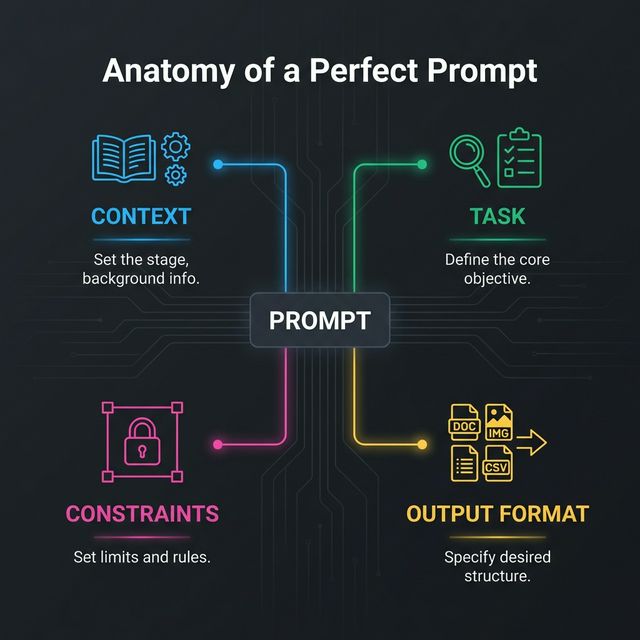
- Context: Who is the AI? What is the background?
- Task: The specific action you want the AI to take.
- Constraints: What should the AI not do? What are the boundaries?
- Output Format: How exactly should the result look? (JSON, Markdown, CSV, plain text).
Pro Tip: If you skip any of these, you are leaving the output to chance.
Secret #1: The "Persona" Pattern is More Than Just a Role
Most people know to say "Act as a copywriter." But advanced engineers go deeper. You need to define the experience level, tone, and specific bias of the persona.
Basic Prompt:
"Act as a Python developer."
Advanced Prompt:
"Act as a Senior Backend Engineer with 10 years of experience in high-scale distributed systems. Your tone is technical, concise, and critical. You prioritize performance and security above all else. When reviewing code, specifically look for race conditions and memory leaks."
Why it works: It narrows the search space in the model's neural network, focusing it on high-quality, expert-level training data rather than generic tutorials.
Secret #2: Use Chain-of-Thought (CoT) Verification
Chain-of-Thought prompting encourages the model to "show its work" before giving a final answer. This is crucial for logic, math, and coding tasks.
The Secret: Don't just ask for the result. Ask for the reasoning first.
"First, think step-by-step about the user's request. Outline your plan in a scratchpad. Then, critique your own plan for potential flaws. Finally, execute the improved plan."
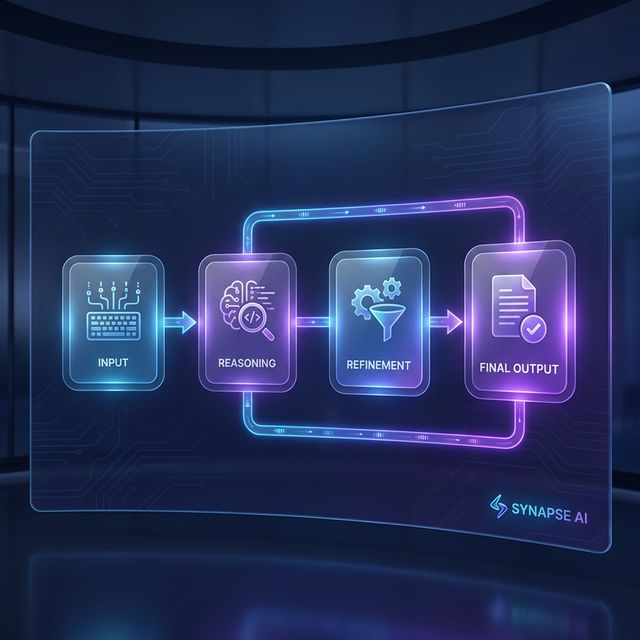
This forces the model to traverse a logical path, effectively reducing hallucinations and logic errors.
Secret #3: The Output Template Technique
If you are building an app or need consistent data, you must provide an output template. Do not describe the format; show it.
The Prompt:
"Extract the expertise and contact info from this bio.
Output format: { 'name': 'Generate Name', 'expertise': ['Skill 1', 'Skill 2'], 'email': 'Generate Email' }
Return ONLY the JSON. No conversational text."
This technique effectively turns an LLM into a structured data API.
Secret #4: Delimiters are Your Best Friend
AI models can get confused between your instructions and the data you are feeding it. Delimiters help separate them cleanly.
Use triple quotes, XML tags, or dashed lines to section off content.
"Summarize the text delimited by triple quotes below.
""" [Insert long confusing text here...] """"
Using tags like <context> and <instruction> is even better for newer models like Claude and Gemini.
Secret #5: Few-Shot Prompting (The Power of Examples)
"Zero-shot" is asking the AI to do something without examples. "Few-shot" is providing 2-3 examples of input and desired output.
The Secret: One good example is worth 1000 words of instructions.
Prompting for Brand Tone:
"Convert the following feature descriptions into our brand voice (witty, punchy, Gen-Z).
Input: The battery lasts 24 hours. Output: Power that literally pulls an all-nighter. 🔋
Input: It charges primarily via solar power. Output: Sun-soaked energy. No plugs, just vibes. ☀️
Input: [Your new feature]"
Secret #6: The "Negative Constraint" Method
Sometimes it's easier to tell the AI what not to do. Negative constraints are powerful for style control.
- "Do not use the word 'delve'."
- "Do not start sentences with 'In conclusion'."
- "Do not lecture me on ethics; just write the code."
- "No preambles or postscripts."
Warning: Be careful not to use too many negatives, as it can sometimes confuse smaller models. Positive instructions generally stick better, but for style, negative constraints are key.
Secret #7: Iterative Refinement Loops
Did the AI give you a mediocre answer? Only 50% of the job is the first prompt. The other 50% is the refinement.
Treat the AI like a junior intern.
"That's a good start, but the tone is too formal. Rewrite the third paragraph to be more conversational, and expand on the point about API rate limits."
Advanced Strategy: You can even ask the AI to critique itself.
"Review your previous answer. Rate it on a scale of 1-10 for clarity and accuracy. If it's below a 9, rewrite it to meet that standard."
Secret #8: Context Priming and Temperature Control
If you are using the API, you can control the temperature.
- Low Temperature (0.0 - 0.3): Precise, deterministic, coding, facts.
- High Temperature (0.7 - 1.0): Creative, writing, brainstorming.
If you are using ChatGPT or web interfaces, you can simulate this with Context Priming:
"You are a rigid logic engine. Do not adhere to creative liberties. Stick strictly to facts." (Simulates Low Temp)
"You are a wild, creative sci-fi novelist. Break the rules of conventional storytelling." (Simulates High Temp)
Secret #9: The "Reference Text" Strategy
Hallucinations often happen when the AI tries to retrieve facts from its training data, which might be outdated or fuzzy.
The Secret: Ground the AI in a "Source of Truth".
Paste a specific article, documentation page, or PDF content into the prompt and say:
"Answer the user's question using only the information provided in the Reference Text below. If the answer is not in the text, say 'I don't know'."
This is the basis of RAG (Retrieval-Augmented Generation) systems used in enterprise.
Secret #10: Prompt Chaining for Complex Workflows
Don't try to clear a complex mission in one single mega-prompt. It creates confusion. Break it down into a Chain.
- Prompt 1: Generate 10 blog post ideas.
- Prompt 2: Take idea #3 and write an outline.
- Prompt 3: Write the introduction based on this outline.
This modular approach ensures high quality at every step of the process.
Practical Use Cases
| Scenario | Optimization Technique |
|---|---|
| Writing Python Scripts | Persona + Chain-of-Thought + CoT |
| Marketing Emails | Few-Shot + Negative Constraints |
| Data Extraction | Output Template (JSON) + Delimiters |
| Legal/Medical Summaries | Reference Text Strategy (Grounding) |
Comparison: Good vs. Bad Prompting
To visualize the difference, look at this comparison.
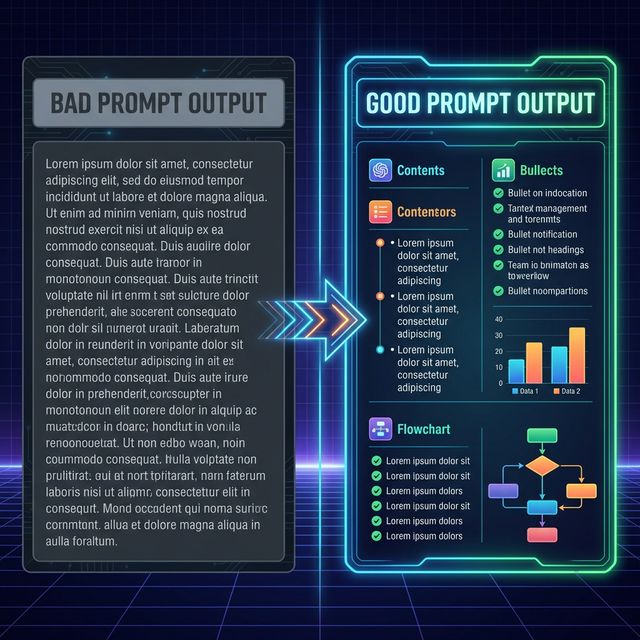
- Left (Bad): Shows a generic, unstructured block of text.
- Right (Good): Shows a structured, formatted response with clear data points using the "Output Template" secret.
Summary
Mastering advanced prompt engineering isn't about memorizing "magic words." It's about understanding how LLMs process information. By using Personas, Output Templates, Chain-of-Thought, and Delimiters, you stop guessing and start engineering.
Start applying just one of these secrets to your workflow today, and you will see an immediate improvement in the quality of your AI interactions.
FAQ
1. What is the most important part of a prompt?
The Task is the core, but the Context is what gives it quality. Without context, the model reverts to the average of its training data (which is usually mediocre).
2. Can I use these secrets with any AI model?
Yes! These principles work across GPT-4, Claude 3, Gemini, Llama 3, and Mistral. While some models handle formatting differently, the logic remains the same.
3. Why does the AI sometimes ignore my constraints?
This usually happens if the prompt is too long or contradictory. Try to place your most critical constraints at the end of the prompt (Recency Bias) or use negative constraints clearly.
4. What is the difference between Zero-Shot and Few-Shot?
Zero-shot means giving no examples (e.g., "Translate this"). Few-shot means giving examples (e.g., "Translate this like the following examples..."). Few-shot almost always yields better results for specific formats.
5. How long should a good prompt be?
There is no perfect length. It should be as long as necessary to provide clarity, but as short as possible to avoid noise. Quality > Quantity.
Ready to optimize your prompts?
Use Promptnia's advanced generator to create the perfect prompt for your needs.
Go to Generator