
How to Write Better AI Prompts: A Step-by-Step Tutorial

Writing a prompt for an AI model feels easy—you just type, right? But getting exactly what you want is a skill. It's the difference between a blurry sketch and a high-definition photograph.
In professional settings, a vague prompt creates technical debt. It requires constant follow-up questions, manual editing, and frustration.
This tutorial will walk you through a battle-tested framework, CREFO, used by AI engineers at top tech companies to ensure precision every single time.
The C.R.E.F.O. Framework
To make prompt writing easier, we've developed the CREFO framework. It creates a structured mental model for communicating with LLMs.
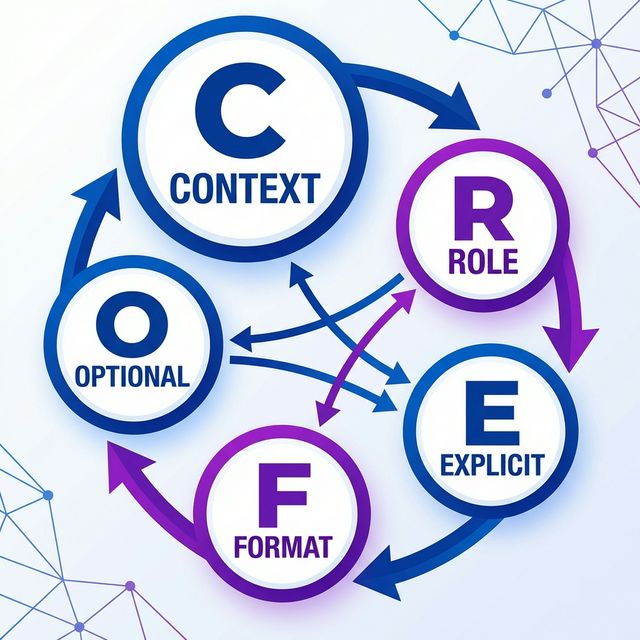
It stands for:
- Context
- Role
- Explicit Instructions
- Format
- Optional Constraints
Let's break down each component with advanced examples.
1. Context (The "Why" and "Where")
Without context, the AI guesses. And the "average" guess is usually mediocre.
- Bad: "Write a marketing plan."
- Good: "We are a Series A Fintech startup launching a budgeting app for Gen Z students. Our key differentiator is 'gamification'. We have a marketing budget of $10,000 for Q3."
Why this matters: The model now knows not to suggest "TV Ads" (too expensive) or "Retirement Planning" (wrong audience).
2. Role (The "Who")
Assigning a persona helps the AI switch its vocabulary, tone, and perspective. This is also known as "Role Prompting."
- Examples:
- "Act as a Senior Copywriter for Apple." (Short, punchy, premium)
- "Act as a Python Backend Engineer." (Efficient, secure, scalable)
- "Act as a compassionate Therapist." (Empathetic, listening, soft)
3. Explicit Instructions (The "What")
Be incredibly specific about the action. Use strong verbs.
- Bad: "Fix this code."
- Good: "Refactor this Python function to be asynchronous. Add type hints to all arguments. Add a docstring explaining the logic."
4. Format (The "How")
Tell the AI how you want the output to look. This is critical for automation.
- Examples:
- "Return the data as a JSON object with keys 'id' and 'summary'."
- "Write a 500-word blog post with H2 headers."
- "Format as a CSV table with columns: Date, Task, Owner."
5. Optional Constraints (The "No's")
Tell the AI what not to do. Negative constraints are powerful for refining style.
- Examples:
- "Do not use the word 'delve' or 'game-changer'."
- "No sentences longer than 20 words."
- "Do not include an introduction; start directly with the code."
Real-World Case Studies
Let's apply CREFO to three distinct scenarios: Coding, Marketing, and Data Analysis.
Case Study 1: The Code Refactor
Objective: specific function improvement.
(Role) Act as a Senior React Developer. (Context) I have a legacy component that uses a large
useEffecthook and is causing re-render issues. (Instruction) Refactor the code below to use a custom hook. Optimize for performance. (Format) Provide the code in a single markdown block, followed by a bulleted explanation of changes. (Constraint) Do not use any external libraries other than React.
Case Study 2: The Cold Email
Objective: Sales outreach.
(Role) You are a B2B Sales Expert. (Context) We are selling an AI scheduling tool to HR managers who are overwhelmed with interviews. (Instruction) Write a cold email sequence (3 emails). (Format) Use the AIDA framework (Attention, Interest, Desire, Action). (Constraint) Keep each email under 150 words. No "I hope this finds you well" fluff.
Case Study 3: The Data Summary
Objective: Executive reporting.
(Role) Act as a Data Analyst. (Context) I have a CSV of customer feedback (attached). (Instruction) Analyze the sentiment and identify the top 3 recurring feature requests. (Format) Present findings in a markdown table. (Constraint) Ignore feedback related to "pricing".
Common Mistakes to Avoid
Even with a framework, beginners fall into these traps.
1. The "Kitchen Sink" Prompt
Trying to do too much in one go.
- Mistake: "Write a book about AI, then translate it to Spanish, and then write a marketing plan for it."
- Fix: Break it down. Prompt 1: Write Chapter 1. Prompt 2: Translate.
2. Ambiguous Pronouns
Using "it", "they", or "this" without clear reference.
- Mistake: "Take the text and summarize it." (Which text?)
- Fix: "Summarize the text delimited by triple quotes below."
3. Ignoring Iteration
Expecting perfection on the first try.
- Reality: The first output is a draft. Treat the AI as a junior partner.
- Fix: "That's good, but the tone is too formal. Make it casually professional."
The "Better Prompts" Checklist
Before you hit send, run your prompt through this quick checklist.
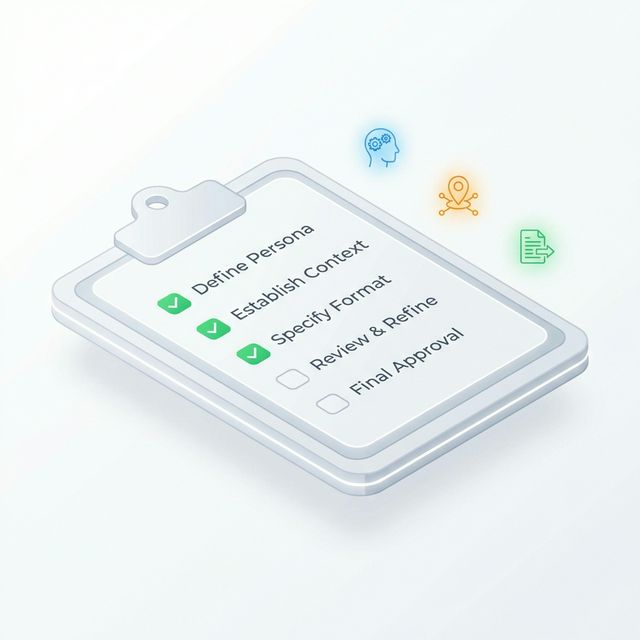
- Persona: Did I tell it who to be?
- Context: Does it know why I need this?
- Constraint: Did I tell it what not to do?
- Format: Did I specify the output structure?
- Clarity: Is it free of typos and ambiguity?
Summary
Prompt engineering is not magic; it's communication. By using the CREFO framework, you move from "hoping for a good result" to "guaranteeing a good result."
Next time you open ChatGPT or Claude, take 30 extra seconds to structure your thought. The AI will thank you (by giving you exactly what you wanted).
Want to see CREFO in action? Try the Promptnia Generator to build structured prompts automatically.
Ready to optimize your prompts?
Use Promptnia's advanced generator to create the perfect prompt for your needs.
Go to Generator